 SafePhone
URL screening permission on Android and iOS: why does it require the default browser?
You won't find a setting called “link screening” on your phone. Instead, on Android an app gets URL screening permission when you set it as your default browser. This article explains how that works on Android, why the iPhone is far more restrictive, and the limits you should know about when using a scam website blocker.
Block scam links before they open with SafePhone

What is URL screening permission?
“URL screening” means checking a link before the website opens, so that links leading to scams, malware or unwanted content can be blocked. Just like the call screening permission does for phone calls, it is the gateway a security app needs in order to step in at the right moment.
The difference is that the operating system has no dedicated permission for this. On Android, an app gains the ability to screen URLs by becoming the default browser — the app that handles the links you tap in other apps.
How does URL screening work on Android?
Android phones let you set an app as your default browser, which makes it the handler for links you tap in other apps (SMS messages, email, note-taking apps and so on).
- You tap an
httporhttpslink. - Android passes the link to the default browser before the website opens.
- The app checks whether the link is on a blacklist, or is a dangerous, scam or malware link.
- If the link is safe, the page opens as usual; if it's flagged as malicious, the app shows a warning and stops you from visiting it.
This works like a protective filter right before you actually open a website, helping you avoid fake sites, scams and unwanted content. It's exactly how SafePhone lets you block scam websites; the blacklist-matching mechanism is explained in how SafePhone works.
Limits of URL screening on Android
For this to work, you have to choose the app as your default browser yourself. And even then, the app only controls the links you tap — it cannot block all network activity across the whole system. Specifically:
- In-app browsers: Facebook, Messenger, WhatsApp and similar apps often open links in their own built-in browser, bypassing the default browser. When you see an unfamiliar link, choose “Open in browser” from the three-dot menu.
- Links that open directly in another app: some links (for example YouTube or banking links) may be opened by Android straight in the matching app instead of a browser.
- Typing an address in another browser: if you open Chrome yourself and type an address, the link doesn't go through the default browser.
- Background connections: data that apps download on their own (in-app ads, updates and so on) isn't a link you tapped, so it isn't screened.
How to change the default browser on Android
Usually the app takes you straight to the browser selection screen. If you want to change it or revoke it yourself:
- Open Settings → Apps.
- Choose Default apps.
- Tap Browser app.
- Pick the app you want, such as SafePhone — or choose Chrome again to revoke it.
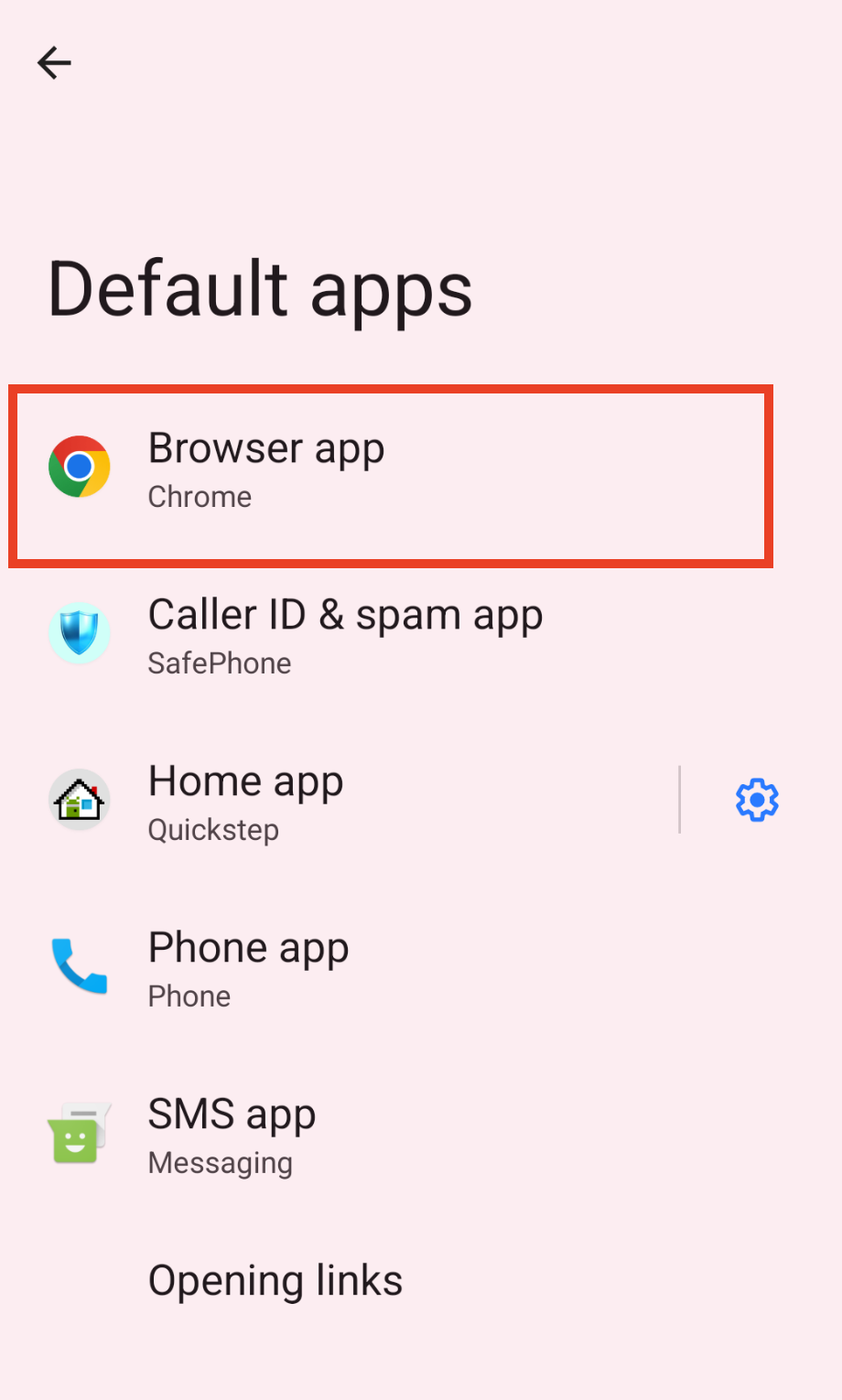
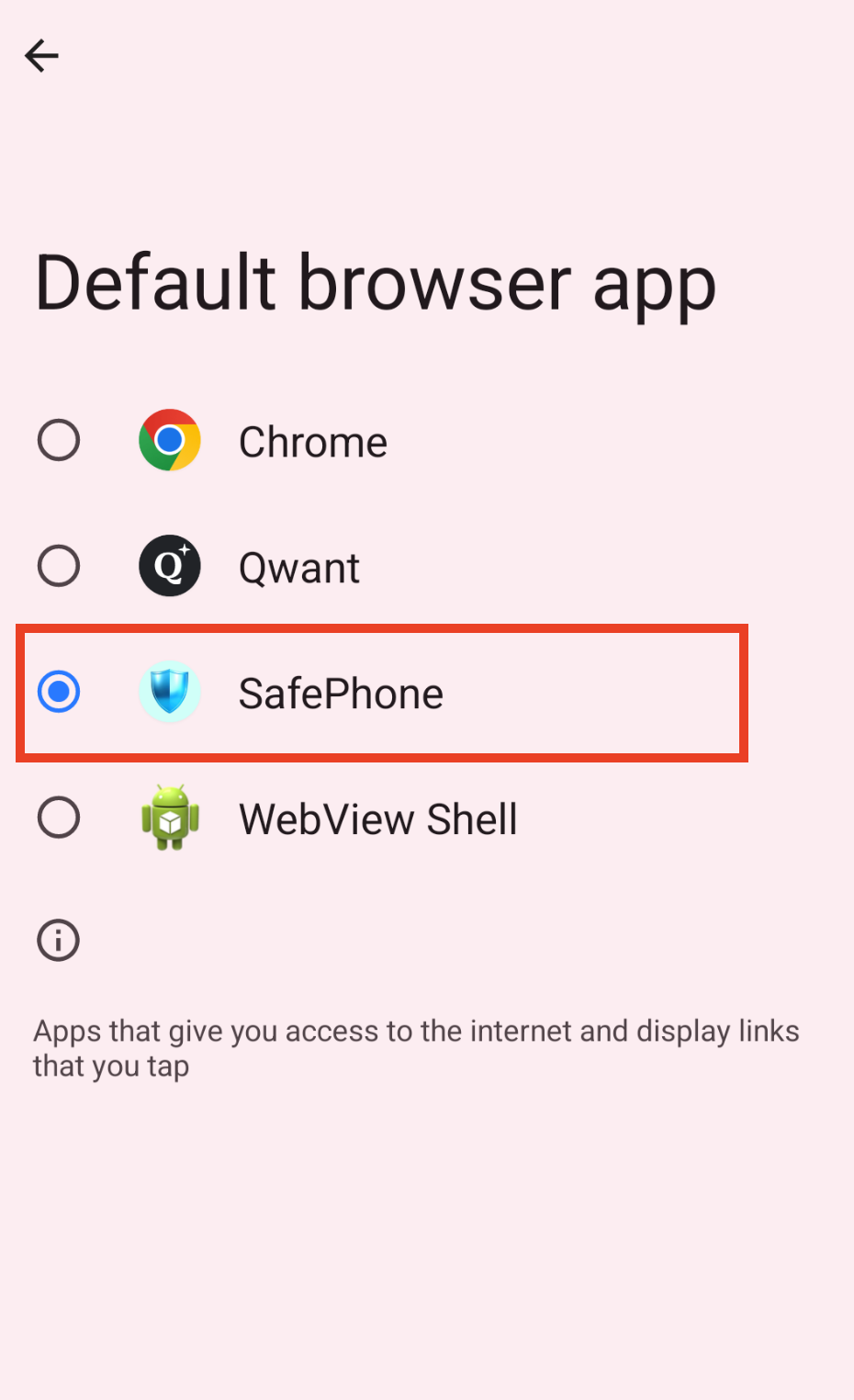
Menu names may vary by manufacturer and Android version. The full step-by-step guide inside SafePhone is in how to block scam websites.
URL screening on iPhone (iOS)
On iPhone, setting an app as the default browser also lets it open links you tap in other apps, but its ability to “screen” or “block” URLs is far more limited than on Android.
- Every
http/httpslink is handed to the default browser to open, but the app cannot automatically block or intercept the link at the system level before it opens; any safety check or warning has to happen inside that browser, after it has received the link. - iOS doesn't let apps block URLs system-wide, nor intercept links opened from other apps before they reach the browser.
- So if you use a browser that can warn about malicious links, that feature only works inside that browser — it isn't a system-wide layer of protection like some Android apps provide.
In other words, iOS lets you change your default browser but doesn't let any app act as a system-wide URL filter.
What should iPhone users do?
- Turn on Safari's built-in scam site warning: Settings → Safari → Fraudulent Website Warning — the name may differ depending on your iOS version.
- Don't tap unfamiliar links in messages; type the official address of your bank or a government agency yourself instead of tapping a link someone sent you.
- Learn how to check if a website is a scam and spot the 12 disguise techniques scam websites use.
URL screening on Android vs. iOS
| Capability | Android | iOS |
|---|---|---|
| Change the default browser | Yes | Yes |
| App checks links before the page opens | Yes, when set as the default browser | Only inside that browser |
| System-wide link blocking | No — only links you tap that open through the default browser | No |
| Links in the built-in browser of Facebook, Messenger, etc. | Bypass the default browser | Bypass the default browser |
Want to compare specific options? See best scam website blocker apps compared. For children, you can use the block harmful sites and allow only trusted websites mode.
Conclusion
On Android, URL screening permission comes from setting an app as your default browser: every link you tap is checked before it opens, although in-app browsers remain a gap. On iPhone, checks only happen inside the browser you use, which makes being careful with unfamiliar links all the more important.
Set SafePhone as your default browser
FAQ
Why does a scam website blocker need to be the default browser?
On Android, the default browser is what receives the links you tap in other apps. Only as the default browser can an app check a link before the website opens.
If I set SafePhone as my default browser, will it block links in WhatsApp or Facebook?
These apps usually open links in their own built-in browser, which bypasses the default browser. Choose Open in browser from the three-dot menu so the link gets checked.
How do I change my default browser back on Android?
Go to Settings, Apps, Default apps, Browser app and pick the browser you want. Menu names may vary by phone manufacturer.
Can an iPhone block scam links system-wide?
No. iOS lets you change the default browser but does not let any app act as a system-wide URL filter. Warnings only happen inside the browser you use, such as Safari's Fraudulent Website Warning.