 SafePhone
How to Check If a Website Is a Scam: 9 Signs of a Fake Website
Today's scam websites look exactly like real banks, online marketplaces and government portals. This guide shows you how to check if a website is a scam: 9 warning signs you can spot yourself, how to look up a site in a public scam database, and how to check any link in seconds with SafePhone.
Check suspicious websites with SafePhone

Common types of scam websites
Many websites deliberately impersonate trusted brands to trick people into entering personal information, bank details or passwords. The most common types:
- Fake banks and e-wallets: ask you to log in so they can steal your password and OTP codes.
- Fake delivery companies, restaurants and hotels: run ads to lure customers into ordering or booking, then disappear once the bank transfer arrives.
- Fake stock, bond and crypto exchanges: promise high returns to get victims to deposit money — see also security apps for crypto traders.
- Fake software download sites: pose as Word, Excel, games, even security software or VPNs, but actually contain malware — see how to detect malicious apps.
- Reward surveys and fake job listings: advertised widely to harvest personal information.
Spotting fake websites early is the best way to protect yourself and the people around you, especially children and older family members.
9 signs of a scam website
1. A domain name that looks almost like the real brand
Scammers swap one character (m becomes rn, o becomes 0), add words like -promo or -support, or use unusual extensions such as .xyz, .top or .cc. Read the domain slowly, character by character — don't just look at the logo.
2. The brand name comes first, but the real domain is at the end
In an address like yourbank.com.verify-account.top, the real domain is verify-account.top — everything before it is just decoration. The real domain is always the part right before the first /.
3. An HTTPS padlock doesn't mean the site is safe
The padlock icon only means the connection is encrypted; it doesn't prove the website is genuine. Most scam sites today use HTTPS.
4. It asks for your password, OTP or card number right away
Banks and government agencies don't text you links asking you to log in or read out an OTP. Any page that demands an OTP the moment it opens is almost certainly a scam.
5. Unbelievably low prices, huge discounts and urgent countdowns
"Only 5 minutes left", "90% off" and "You've won an iPhone" are pressure tactics designed to stop you from thinking.
6. Payment only by transfer to a personal bank account
If the account holder's name doesn't match the company name, or the site doesn't offer cash on delivery, be suspicious.
7. Thin contact details
No address, no tax ID, no customer service hotline — or just a single mobile number and a messaging-app account.
8. Typos, blurry logos and a patched-together design
Fake pages are usually copied in a hurry, so they often have spelling mistakes, broken images or buttons that don't work.
9. The link came from a text message, an ad or a random comment
If you didn't type the address yourself but tapped it from an SMS, a WhatsApp, Telegram or Messenger message or a scam ad, assume it's suspicious and check it carefully before entering any information.
Scammers also use more sophisticated tricks to make scam pages look "clean" when they're inspected — read more in 12 camouflage techniques scam websites use.
How to check a website with SafePhone
Not sure whether a link is safe? SafePhone checks it for you in seconds:
- Open the SafePhone app. If you don't have it yet, get SafePhone on Google Play.
- Paste the link into the "Check URL" box.
- Read the result:
- Safe: the website is trustworthy.
- Warning: the website shows signs of impersonation or is dangerous.
- If you get a warning, do not enter any personal information or log in.
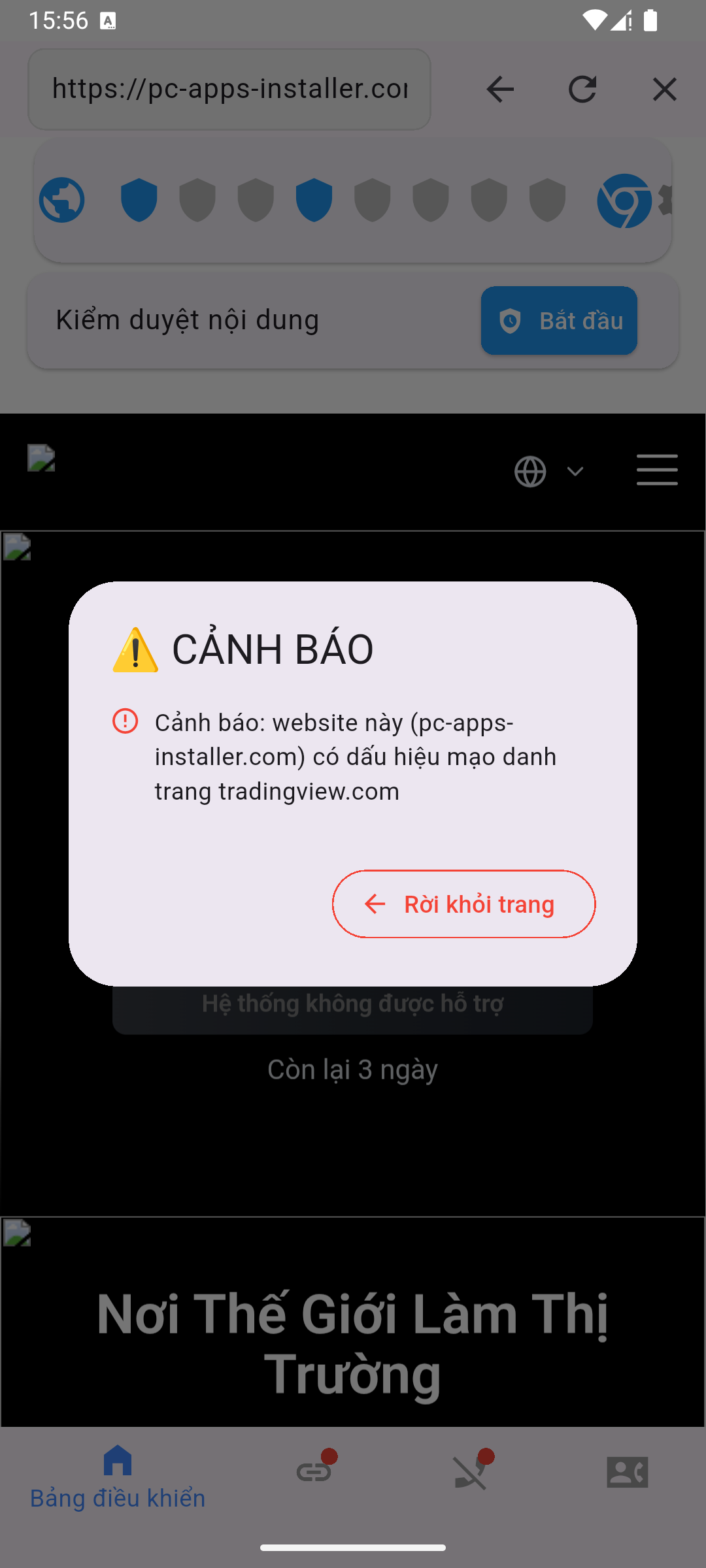
SafePhone helps you:
- Detect fake websites before you visit them
- Protect your personal information and online accounts
- Get timely warnings for you and your family
- Stay safe easily, with no technical knowledge needed
Look up a website in a public database
You can also look up a domain in Google Safe Browsing site status: type the address into the search box and it tells you whether Google currently flags the site as unsafe. Many countries also run an official scam-reporting service or cybercrime reporting portal where you can check or report suspicious websites.
Note: new scam sites appear every day, so a site not being on the list doesn't guarantee it's safe — combine the lookup with the 9 signs above.
Block scam websites automatically, no manual checks needed
Checking every link is a good habit, but older adults and children rarely remember to do it. With SafePhone, the checking can happen automatically:
| Feature | How it works | Best for |
|---|---|---|
| Block scam websites | Every link is checked against a blacklist before it opens | Everyone |
| Allow only trusted websites | Only approved sites can be opened | Children, older adults |
| Block ads on Android | Blocks ads that lead to scam pages | Frequent online shoppers |
| Browse the web safely | Use SafePhone as your everyday browser | Less tech-savvy users |
Why does SafePhone need to be your default browser to block sites automatically? See URL screening permissions on Android and iOS. For how it stacks up against other tools, read scam website blocker apps compared.
What to do if you entered your details on a scam site
- Immediately call your bank's official hotline (the number on the back of your card) to lock your account and cards.
- Change the password you entered, plus the password of every other account that uses the same one.
- Turn on two-factor authentication for your email and social media.
- Report the scam site, and file a police report if you have lost money.
Conclusion
No single sign is 100% reliable, but when a website has a strange domain, asks for your OTP and pushes you to transfer money, it's almost certainly a scam. Make it a habit to check before entering any information — and let SafePhone do the checking automatically for less tech-savvy family members.
Check scam websites for free with SafePhone
FAQ
How can I check whether a website is a scam?
Read the domain name carefully, and be suspicious if the site immediately asks for an OTP or password, offers unusually low prices, or only accepts transfers to a personal bank account. You can paste the link into SafePhone's URL check box or look up the domain in Google's Safe Browsing site status tool.
Is a website with an HTTPS padlock safe?
No. The HTTPS padlock only means the connection is encrypted; it does not prove the website is genuine. Most scam sites today use HTTPS.
If a domain isn't on a scam blacklist, is it safe?
Not necessarily. New scam sites appear every day and may not have been added to the list yet. Combine a lookup with checking for the warning signs.
What should I do if I entered my banking password on a scam website?
Call your bank's official hotline right away to lock your account and cards, change your password, turn on two-factor authentication, and report it to the police if you have lost money.