 SafePhone
What Is the Call Screening Permission? How It Differs on Android and iOS
When you install a spam call blocker on Android, you're usually asked to grant the call screening permission. This permission lets the app see the incoming number and decide whether to block the call or let it ring before your phone actually rings. This article explains what the permission can do, whether it's safe, how to grant and revoke it, and why iPhone doesn't allow calls to be blocked the same way.
Block unknown and scam numbers automatically with SafePhone

What is the call screening permission?
On Android, the call screening permission lets an app receive and process call information before your phone rings. Technically, Android (version 10 and later) provides a “call screening app” role — in Settings, this is usually listed as Caller ID & spam app.
A few key points:
- By default, no app has this permission until you actively grant it to a specific app.
- Only one app can hold the call screening permission at a time. Choosing a new app means replacing the old one.
- You can revoke or re-grant the permission at any time.
- According to Android's documentation, screening applies to calls from numbers not in your contacts — people you've saved can still call you as usual.
What can an app with call screening permission do?
When a call comes in, Android sends the call information (such as the phone number) to the screening app. The app can use it to:
- Block spam and scam calls — your phone never rings.
- Reject the call as if you'd tapped decline yourself.
- Silence a suspicious call instead of blocking it outright.
- Show a warning such as “spam / scam call,” or help identify who's calling.
- Optionally keep the call out of your call log or skip the missed-call notification for blocked calls.
The auto-answer-by-assistant feature you may have heard of (for example Google Assistant's Call Screen on Pixel phones) is a feature of Google's own Phone app, not something every app with the call screening permission can do.
Is it safe to grant the call screening permission?
The call screening permission tells an app who is calling so it can decide whether to block the call or let it through — it does not let the app listen to or record your calls. That said, incoming phone numbers are still personal data, so keep in mind:
- Only grant the permission to apps downloaded from Google Play, from an identifiable developer, with a public privacy policy.
- Be wary of “call blocker” apps sent to you as a link or APK file — this is a common way to spread malware. See how to spot malicious apps.
- Check what other permissions the app asks for (contacts, SMS, accessibility…) and only grant them if you understand why they're needed.
How to grant and revoke the call screening permission on Android
Granting it from inside the app
Usually, a call blocker app shows a system dialog asking whether you want to set it as your call screening app. Just pick the app from the list and confirm.
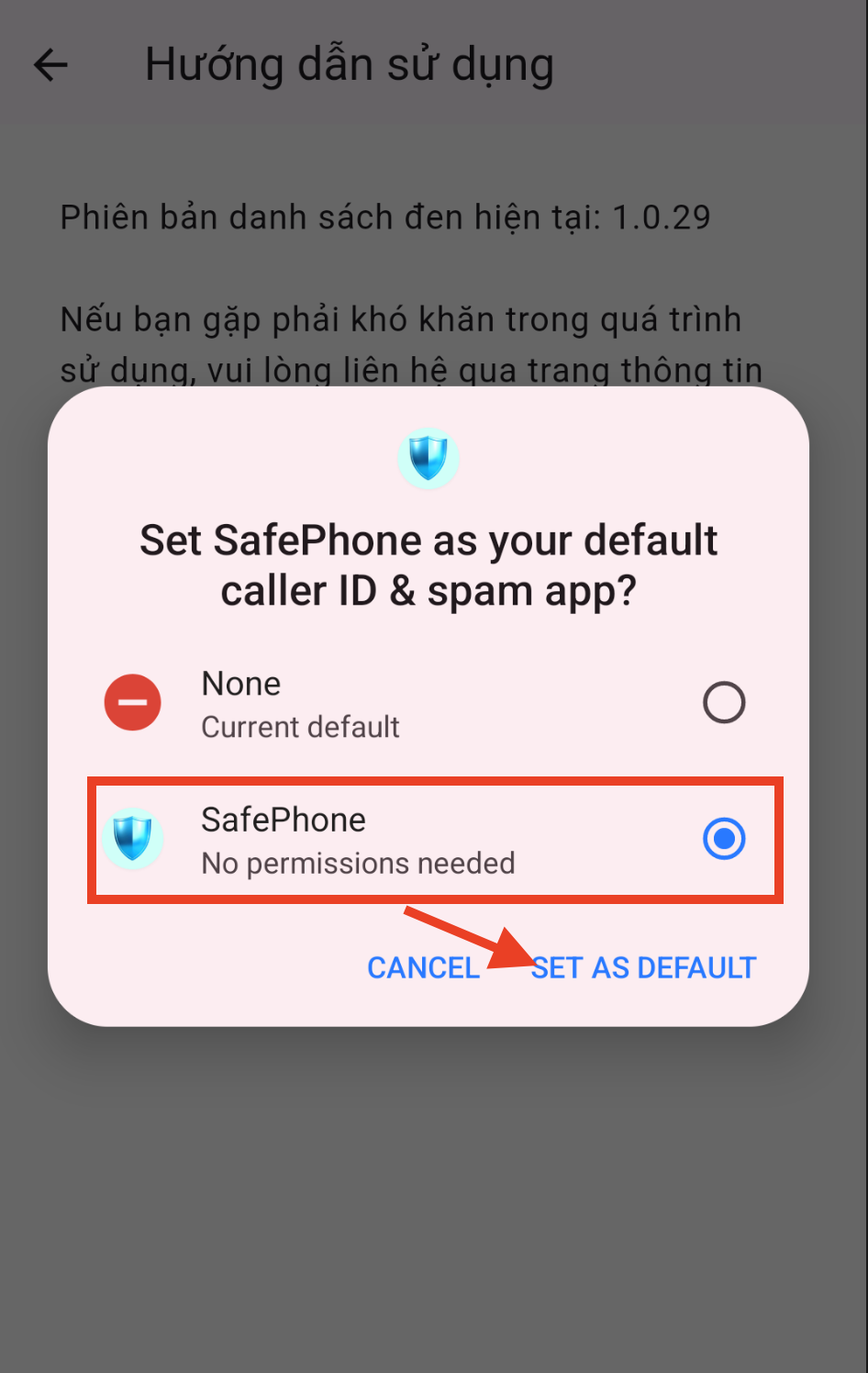
Changing or revoking it in Settings
- Open Settings → Apps.
- Select Default apps.
- Select Caller ID & spam app.
- Choose a different app, or choose None to revoke the permission.
What about iPhone?
iPhone doesn't offer third-party apps a call screening permission in the same sense as Android. iOS does not let third-party apps:
- Hear a call before you do
- Answer calls for you, or let a virtual assistant talk to the caller
- See a live transcript while the caller is speaking
- Block by prefix, by pattern, or with custom logic at the moment a call comes in
Instead, iOS only offers Call Blocking & Identification (which Apple calls the Call Directory Extension, part of CallKit), which lets apps:
- Preload a list of blocked numbers (a block list)
- Attach a label (tag) to incoming numbers
This list is loaded into the system in advance; the app never “sees” the call when it arrives, so it can't make decisions call by call. You enable these apps under Settings → Phone (or Apps → Phone) → Call Blocking & Identification (the menu name may vary by version). That's why the Android “Extended blocking” feature may not yet be available on iOS.
Apple's built-in features
Apple has a built-in Silence Unknown Callers option that sends calls from unknown numbers to voicemail. Starting with iOS 26, Apple's Phone app also offers Screen Unknown Callers: the iPhone asks the caller who they are and why they're calling, then shows you their answer so you can decide whether to pick up. This is Apple's own feature — third-party apps still don't get an equivalent permission.
Call screening on Android vs iOS compared
| What third-party apps can do | Android (call screening permission) | iOS (Call Directory Extension) |
|---|---|---|
| Check the number when a call comes in | Yes | No — can only preload a list |
| Block blacklisted numbers | Yes | Yes |
| Label numbers as “spam / scam” | Yes | Yes |
| Block by prefix or pattern | Yes | No |
| Allow only contacts to call | Possible | Not via apps (use Apple's Silence Unknown Callers option) |
| Number of apps allowed at once | One | Several can be enabled |
What does SafePhone use the call screening permission for?
SafePhone needs the call screening permission for its call-blocking modes to work:
- Block unknown and scam numbers automatically — blocks calls from numbers on the blacklist.
- Block calls by number prefix or pattern — blocks a range of numbers matching a format you choose.
- Block calls from numbers not in contacts — only trusted numbers can call, ideal for seniors and children.
- Protect your family from scam calls — sends an alert when a family member gets a call from an unknown number.
To turn it on, open SafePhone → tap the row of shield icons → choose a call-blocking mode → tap “Activate unknown-number shield” → select SafePhone in the Android dialog. Learn more in how SafePhone works. Not sure which app to choose? See the best call blocker apps compared.
Conclusion
The call screening permission is Android's official mechanism for letting an app block spam and scam calls before your phone rings. Only one app can hold it at a time, and you can revoke it whenever you like. On iPhone, third-party apps are limited to preloading block lists and labels, so Android-style flexible blocking isn't possible there yet.
Give SafePhone the call screening permission
FAQ
What is the call screening permission?
It's an Android permission (Android 10 and later) that lets an app receive information about an incoming call, such as the phone number, before your phone rings, so it can decide whether to block the call, silence it, or let it through.
Can I give the call screening permission to two apps at once?
No. Android only lets one app hold the call screening permission at a time. Choosing a new app replaces the old one.
Can an app with the call screening permission listen to my calls?
No. The permission only provides call information, such as the incoming number, so the app can decide whether to block it. It does not allow the app to listen to or record your calls.
How do I revoke the call screening permission?
Go to Settings, Apps, Default apps, Caller ID & spam app, then choose a different app or None. Menu names may vary by phone manufacturer.
Can an iPhone block scam calls automatically?
Third-party apps on iPhone can only preload a list of blocked numbers and caller labels through the Call Directory Extension. iPhone has a built-in Silence Unknown Callers option that silences calls from unknown numbers, and starting with iOS 26 Apple offers its own feature for screening calls from unknown numbers.