 SafePhone
How to Know If a Family Member Clicked a Scam Link: Get Remote Alerts
A “claim your loyalty gift” text, a link to “update your biometrics” — your young child or elderly parent can tap one without you ever knowing. This guide shows you how to get alerts when a family member opens a suspicious link or scam link with SafePhone, and what to do right away if they already clicked one.
Get suspicious-link alerts with SafePhone

Where do scam links reach your family from?
Kids and older adults can accidentally tap malicious links in SMS messages, WhatsApp, Telegram or Messenger chats, emails, social media comments, or scam ads. Common consequences include:
- Fake websites asking for personal information, passwords, or OTP codes
- Downloading malware or apps impersonating government agencies
- Losing control of the device or personal data
- Your family member not realizing they're in danger until money is gone
See the most common scripts in Common scam tactics in 2026.
Why alerts, not just blocking?
SafePhone can block known scam websites or allow only trusted websites. But new scam pages pop up every day, and not every device suits the strictest blocking mode. Alerts are a second layer of protection:
- Get instant alerts when a family member interacts with a dangerous link
- Call them in time to help before they enter details or send money
- Keep an eye on several family members in one place
- Fit into your Slack workflow if you need to follow up
How to turn on alerts when a family member opens a suspicious link
First, create a Slack channel for alerts for your family and get the channel ID and bot token. Then, on your family member's phone:
- Install SafePhone from Google Play and set SafePhone as the default browser so links get checked.
- Open SafePhone and tap the row of shield icons at the top.
- Tap “Send alerts to family”.
- Enter a device name, e.g. “Dad's phone” or “Timmy's tablet”.
- Choose “Send via Slack”.
- Paste the channel ID and bot token into the “Slack channel settings” section.
- Check the options under “When the user taps a link, send an alert if” — for example, the link is on the blacklist or the page shows signs of impersonation.
- Tap “Save”.
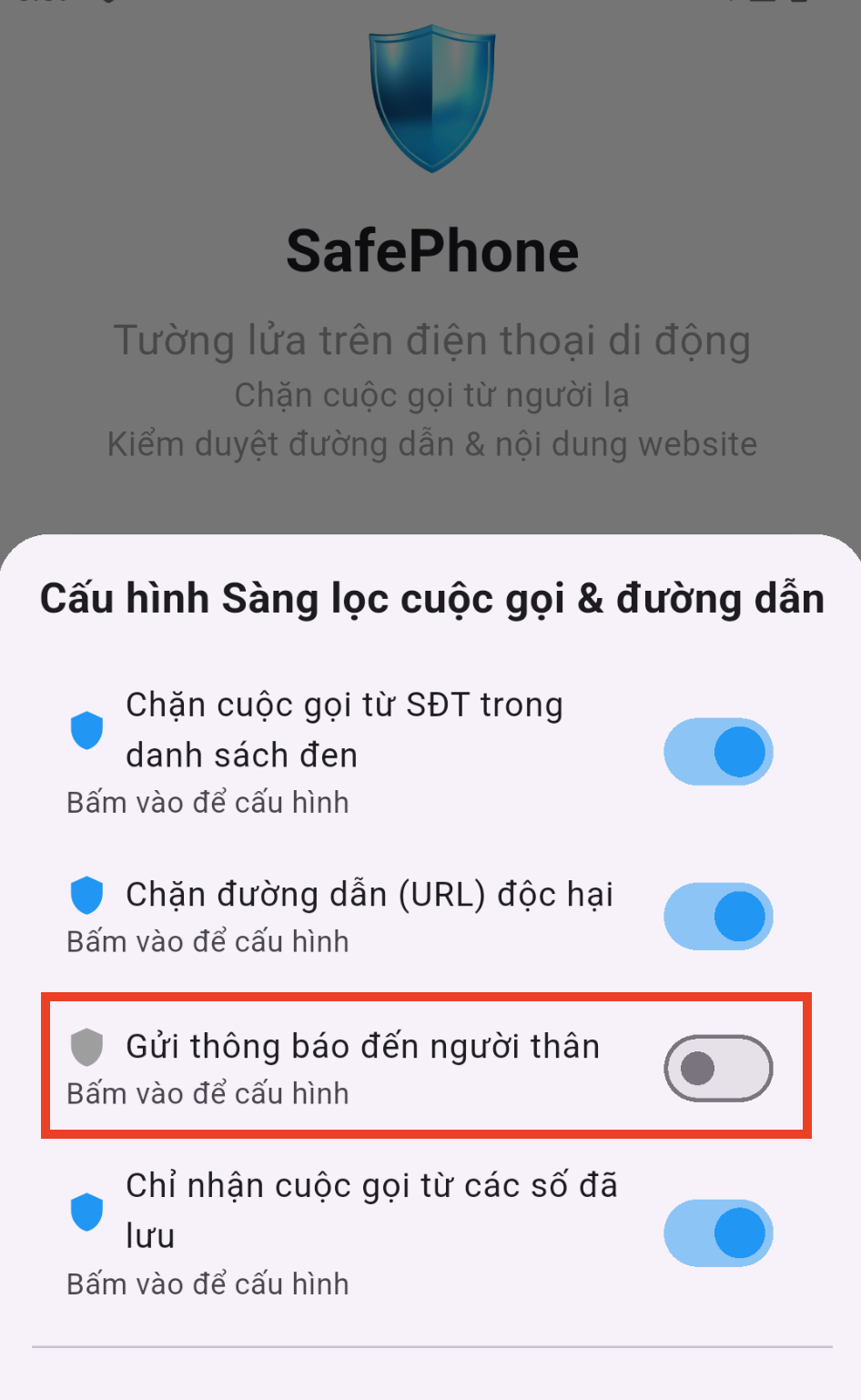
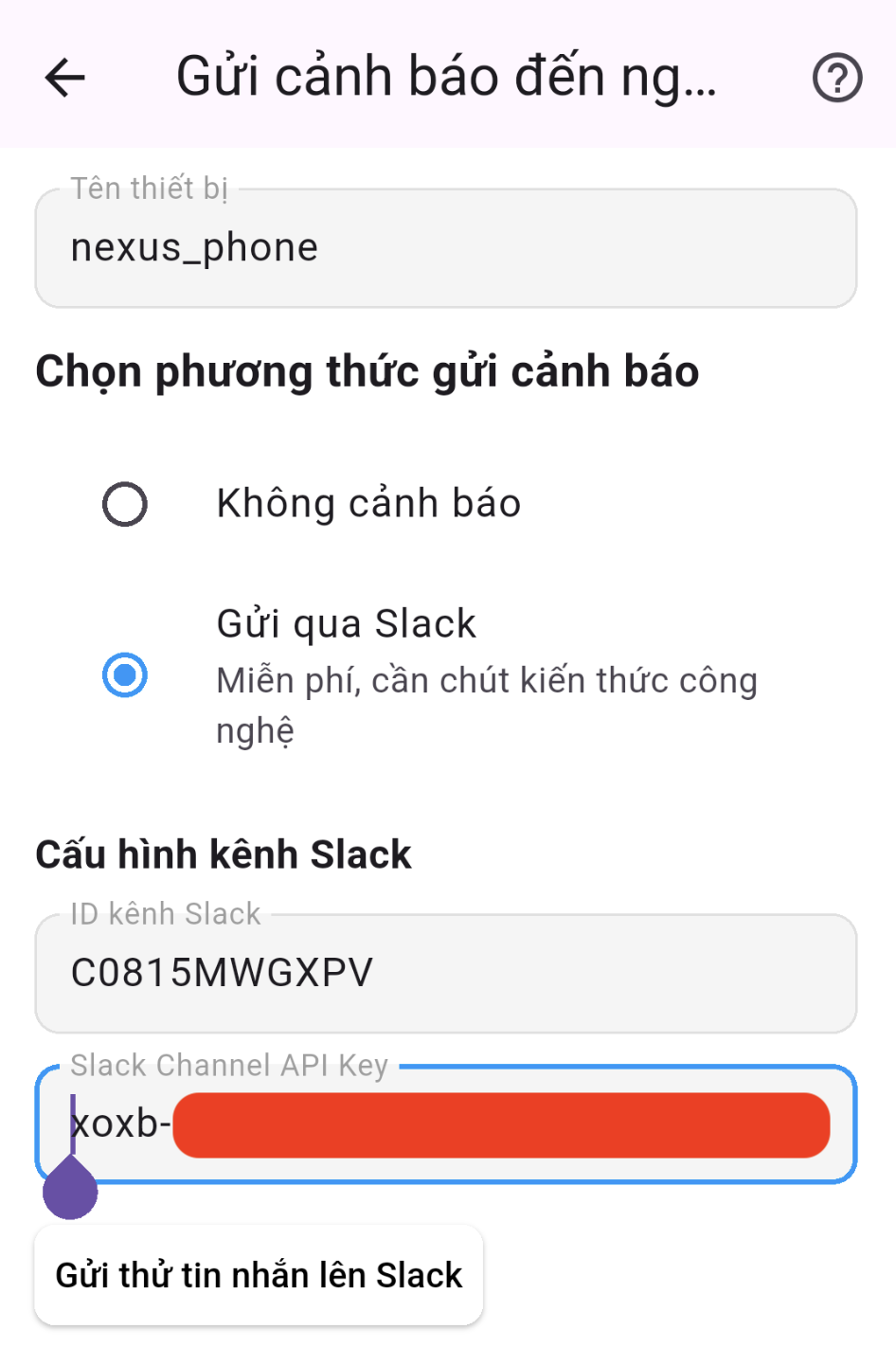
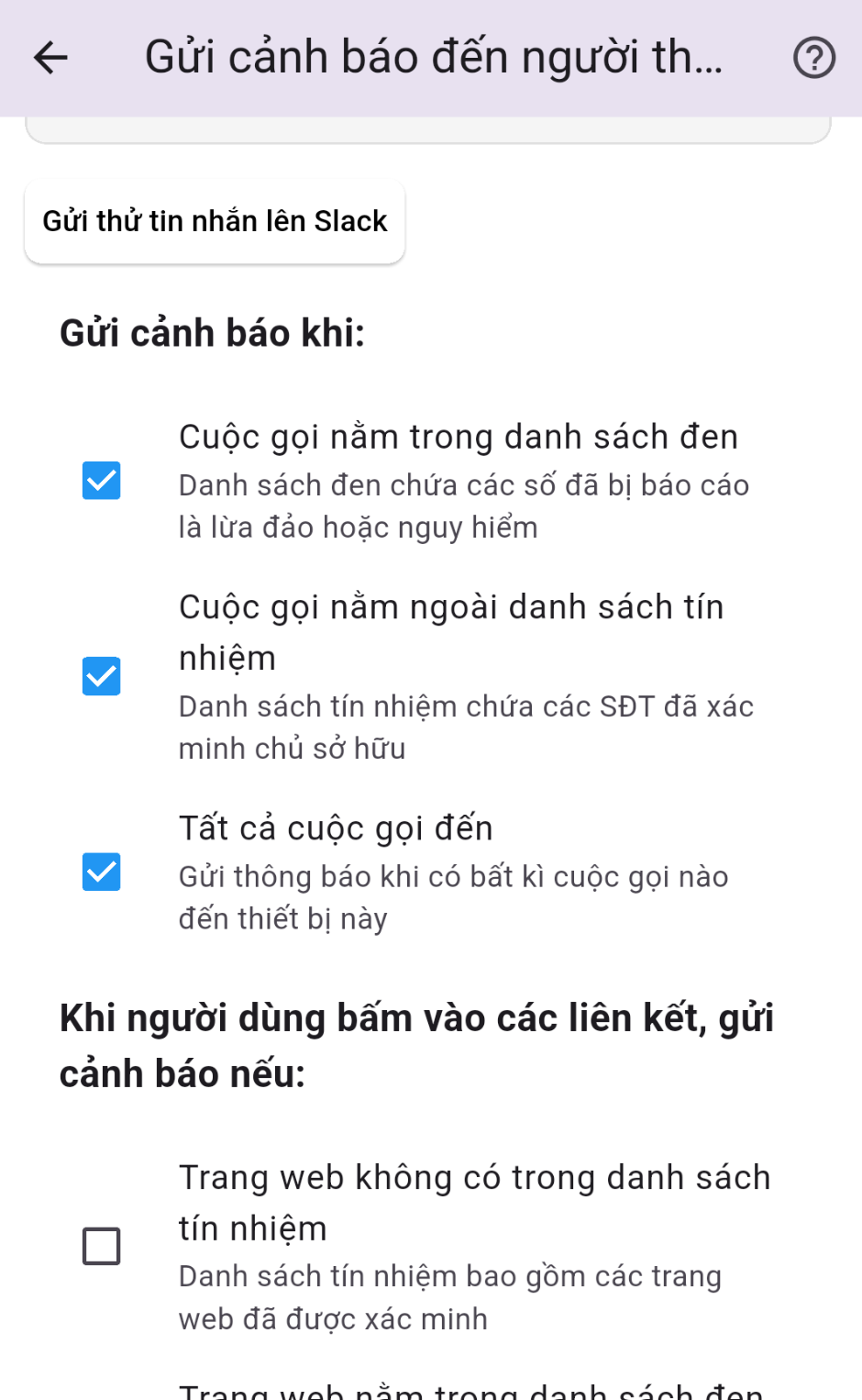
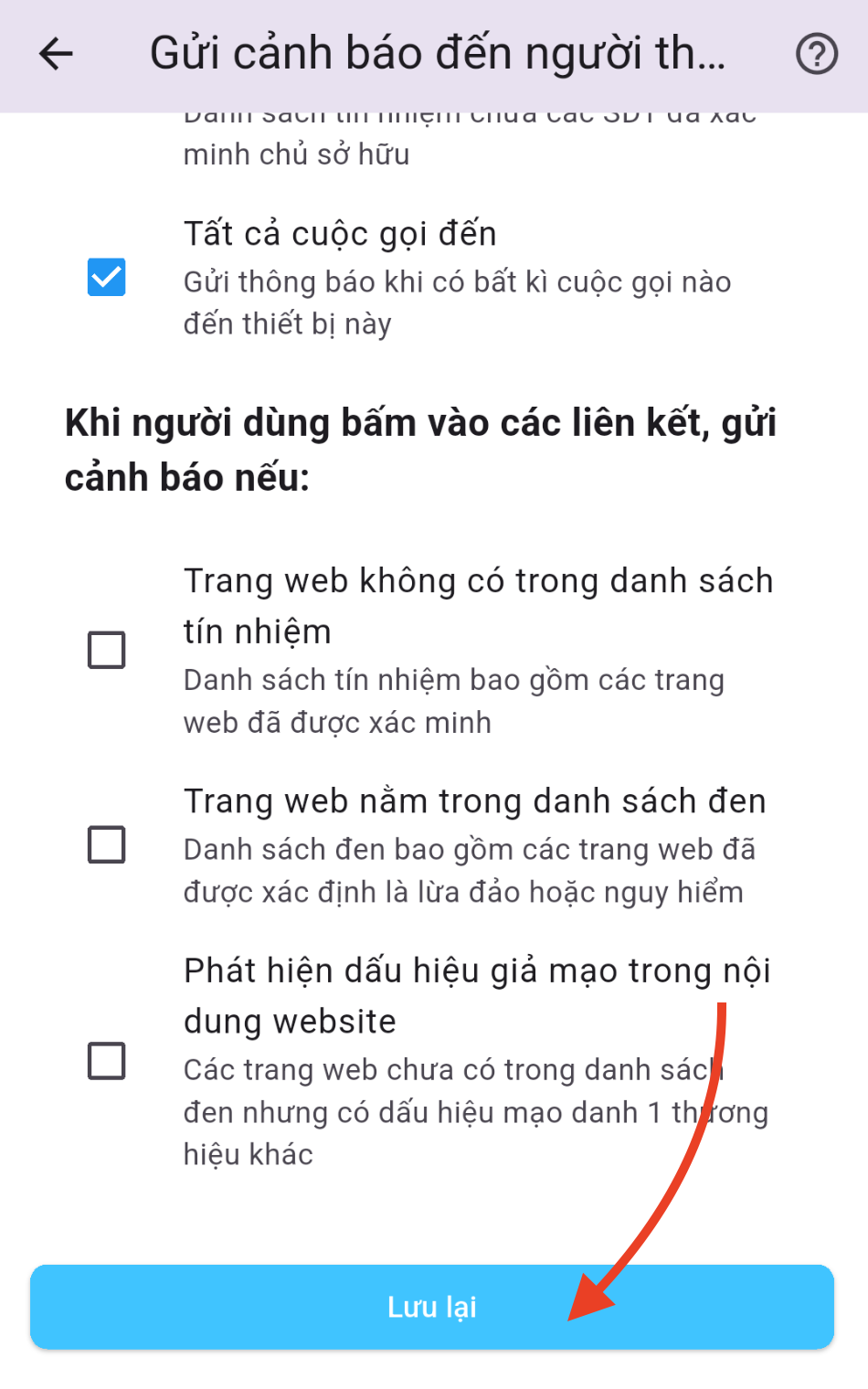
From then on, whenever your family member taps a link that matches the conditions you chose, SafePhone posts a notification to your family's Slack channel so you know what's happening and can act quickly.
Note: links opened inside the built-in browsers of Facebook, Messenger, Instagram or Telegram may not pass through SafePhone — show your family member how to choose “Open in browser” for unfamiliar links. Why? See URL screening permissions on Android and iOS.
What to do if a family member clicked a scam link
Just tapping a link without entering anything usually does no harm, but it's still worth checking. When you get an alert, call your family member and go through these steps in order:
- Close the page immediately and don't enter any more information.
- Entered a banking password or OTP? Immediately call the bank's official hotline (the number on the back of the card) to lock the account and card.
- Downloaded or installed an unfamiliar app? Turn on airplane mode to cut the connection, uninstall that app, and check whether any unfamiliar app has been granted Accessibility permission — see how to spot malicious apps.
- Change the passwords for any accounts entered, ideally from a different device, and turn on two-factor authentication.
- Report it to the police if money was lost, and report the scam site so others don't fall for it.
Want to check a link yourself before tapping it? See How to check if a website is a scam.
Setting it up for the whole family
- Install SafePhone on your kids' and parents' phones and tablets.
- Turn on suspicious-link alerts (and unknown-call alerts) on every device.
- Install Slack on your own phone to receive alerts from the channel you created.
Find more tools for your family: Apps to protect children on phones and Apps to protect elderly parents.
Conclusion
No filter blocks 100% of scam links, but finding out in time when a family member taps a dangerous link lets you stop the damage before it's too late. Set it up once, and you can worry less when you're not there with your kids and parents.
Turn on suspicious-link alerts for your family
FAQ
How can I tell if my child or parent clicked a scam link?
Install SafePhone on your family member's phone, set SafePhone as the default browser, and turn on Send alerts to family via Slack. You'll get an alert whenever they tap a link that matches the conditions you chose, such as a blacklisted link or a page showing signs of impersonation.
I clicked a scam link but didn't enter anything. Am I safe?
Usually no harm is done if you didn't enter any information or download any files. Close the page right away and check whether any unfamiliar app was recently installed on the phone.
What should I do if a family member entered an OTP on a scam link?
Immediately call the bank's official hotline to lock the account and card, change passwords from a different device, turn on two-factor authentication, and report it to the police if money was lost.
Do I need to turn on call alerts separately?
Suspicious-link alerts and unknown-call alerts are configured on the same Send alerts to family screen. You can turn on either one or both.